
⚠️ Premium Feature Notice: Cost Recovery is a premium feature. It is currently available to all users through March 31st, after which access will be limited based on subscription level.
Overview
The Cost Recovery feature allows admins to calculate and report billable capture costs so they can be passed back to clients. These reports include all supported capture types—web pages, videos, and documents—and provide flexible pricing controls to align with your billing strategy.
Note: Cost Recovery reporting is only available to admin users.
Accessing Cost Recovery Reports
-
Log in to the Page Vault Portal as an admin.
-
Click Reports in the top navigation.
-
Use the toggle at the top of the page to switch from Basic Reports to Cost Recovery.
Report Views
Each report includes the following details:
-
Capture type
-
Deletion status (active or deleted)
-
Number of billable pages
-
Total cost that can be billed back to clients
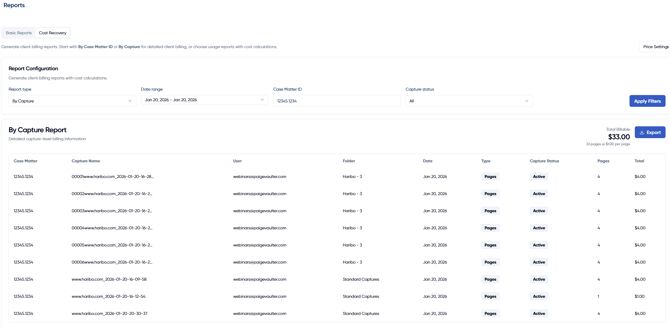
How Page Counts Are Calculated
Page counts are standardized across capture types to simplify billing:
-
Videos: Count as 10 pages per file
-
Documents and all other file types: Count as 1 page per file
These page totals are used to calculate the final billable cost based on your pricing settings.
Configuring Price Settings
Click Price Settings to customize your cost recovery rates.
From this window, admins can:
-
Set a price per page
-
View the suggested rate, which is calculated based on your subscription price and page limit (assuming full page usage)
-
Adjust pricing strategically:
-
Increase the rate if you do not expect to meet your full page limit
-
Lower the rate to offer discounted pricing to clients
-
Raise the rate above the suggested amount to generate profit
-
Pricing is fully customizable and not capped. All pricing changes are logged and visible within Price Settings, providing a clear history of rate adjustments over time.