
Standard Capture Types
Full page - Captures the entire page from top to bottom as a single output. Keyboard shortcut: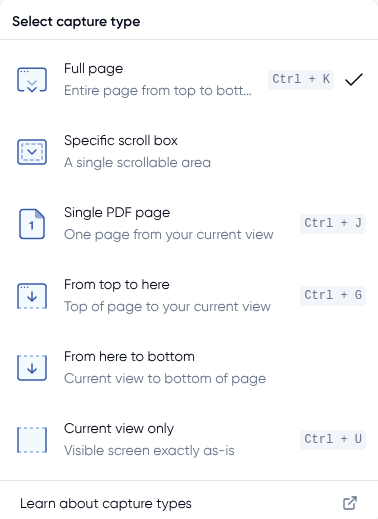 Ctrl + K
Specific scroll box - Captures a single scrollable area on the page, rather than the full page.
Single PDF page - Captures one page from your current view as a single PDF page. Keyboard shortcut: Ctrl + J
From top to here - Captures everything from the top of the page down to your current scroll position. Keyboard shortcut: Ctrl + G
From here to bottom - Captures everything from your current scroll position to the bottom of the page.
Current view only - Captures only the visible portion of the screen exactly as it appears.
Keyboard shortcut: Ctrl + U
Social Media and Platform Captures
These capture types are designed specifically for social media profiles and posts. They automatically expand content, comments, and replies before capturing.
Facebook - Expands and captures posts on a user's profile.
- Profile level: Generates 2 PDF outputs — one with a scrolling capture of the timeline, and a second with all posts, content, and comments expanded.
- Post level: Generates 1 PDF per post with all comments and replies expanded.
Instagram - Expands and captures posts on a user's profile.
- Profile level: Generates a capture of the overall profile grid, plus a separate PDF for each individual post with comments expanded.
- Post level: Generates 1 PDF per post with all comments and replies expanded.
TikTok - Expands and captures posts on a user's profile.
- Profile level: Generates a capture of the overall profile grid, plus a separate PDF for each individual post with comments expanded.
- Post level: Generates 1 PDF per post with all comments and replies expanded.
YouTube - Expands the video description as well as all comments and replies on a YouTube video.
LinkedIn - Expands all comments and replies on individual posts.