💡 Looking for the legacy browser? Switch to the legacy version of this article.
Page Vault automatically includes a portion of the previously captured page at the top of the following page in your capture. This ensures that no content is skipped, cut off, or omitted, helping you confirm the continuity of the capture.
You can control how much repeated content appears by adjusting the PDF page overlap setting, which is now measured as a percentage of the page height.
- Default setting: 13% of the page height
- Raise the percentage to show more repeated content from the previous page
- Lower the percentage to show less repeated content
You'll find this setting in the Advanced Capture Options section of the Capture panel in the Page Vault Browser. To access it, click Capture Page in the sidebar, then check Advanced capture options to expand the menu. Adjusting the overlap gives you more control over how your captures display and ensures clarity when reviewing content across pages.
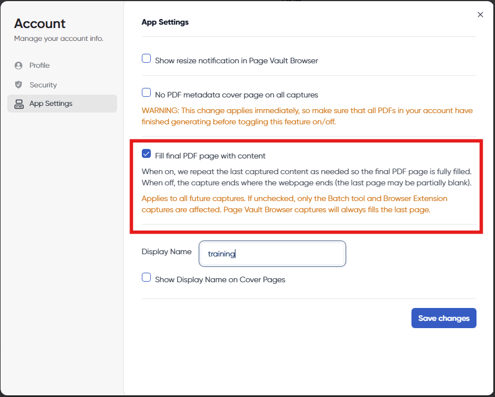
When using the Batch tool, you can also choose whether the final page should be filled with repeated content or left blank. This option can be set in your Account Settings by navigating to:
Manage Account > App Settings.